← Home

Evolve. Ask for a feature. Pracler builds it.

Pracler has everything a practice needs from day one. Evolve is for the day you want something it doesn’t do yet.

Pracler Helper

I’ve uploaded our bank statement. Which invoices does it show as paid?

Pracler can’t match bank payments to invoices yet. I’ll build that for you now.

Building: match bank payments to invoices

Done. Here are the invoices your statement shows as paid, and a short film on how it works. Matching bank payments · 1 min

NewBank matching is ready in Finance

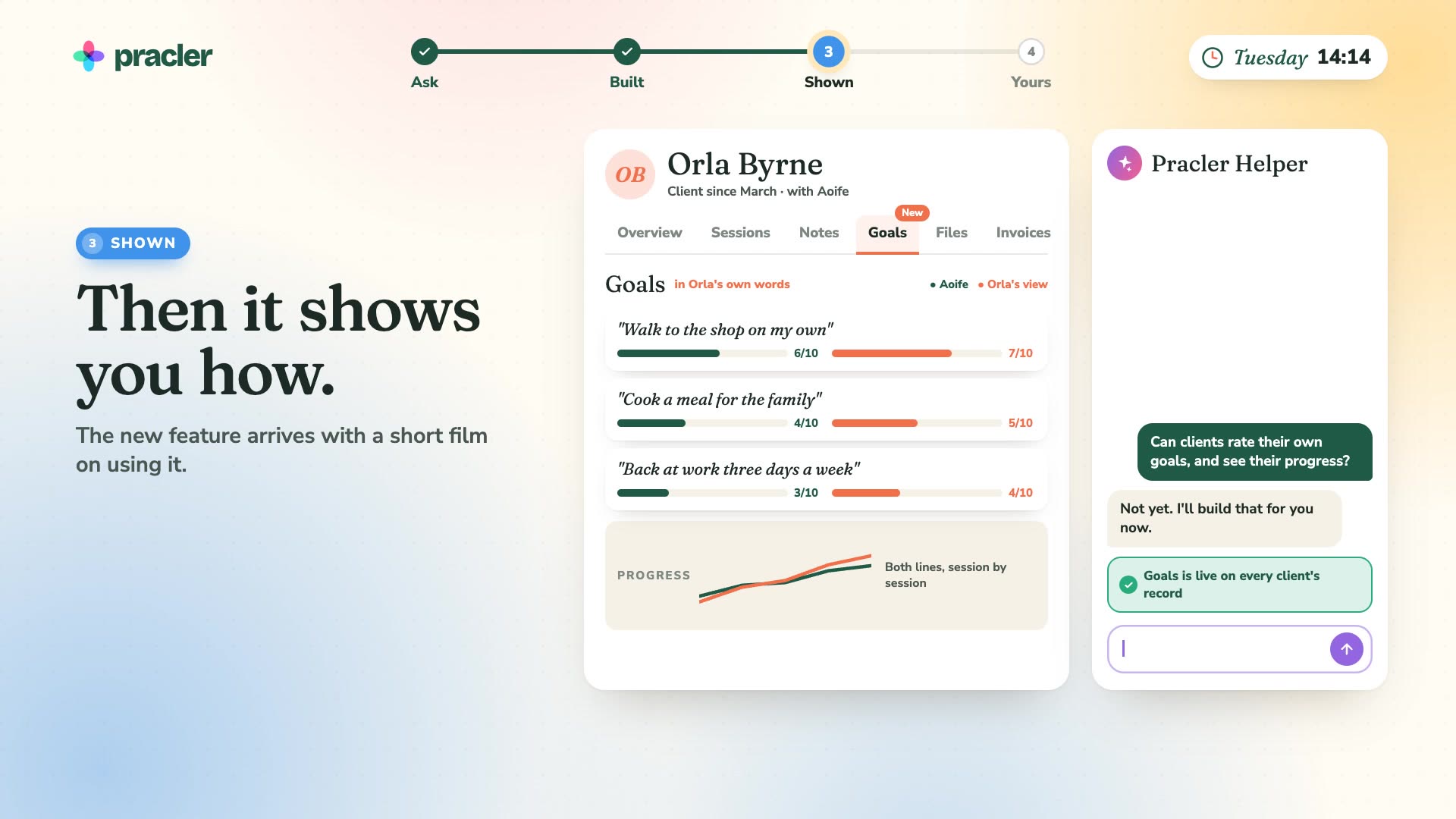
Watch an owner ask for client goal ratings, and Pracler build them.

Watch the film · · sound on

A feature built while the owner asks for it36 sec · sound on

An animated film in four steps: ask, built, shown, yours. A practice owner has a client’s record open and asks the Pracler Helper whether clients can rate their own goals and see their progress. The Helper says not yet, and builds it. A Goals tab appears on the record, with three goals in the client’s words, each scored by the practitioner and by the client, and a progress chart. Eleven minutes pass on the clock. The Helper hands over a short film on how to use Goals. Then a list of what is new in Pracler this month shows the feature, checked by Pracler’s team and there for every practice.

Read the transcript

You know how you want your practice to run. So just ask.

Aoife asks the Helper: can clients rate their own goals?

Pracler can’t do that yet. So it builds it, while she watches.

A Goals tab appears on the client’s record, with a short film on how to use it.

It’s checked by Pracler’s team, and added for every practice.

Ask. It’s built. It’s yours.

Pracler. The practice that runs itself.

Day one

Pracler is complete on day one.

Booking, notes, invoices, reports and your website all work from your first morning. You never have to ask for anything.

  • Nothing to build or teach before you start
  • Every feature on this site is in every plan
  • 97 automations, each with its own switch
  • Evolve is there when your practice changes

See every feature

Your first morningReady before you ask

Evolve adds to this. It never replaces it.

How Evolve works

Ask. It’s built and checked. It’s in your Pracler.

You ask the Helper, the assistant on every Pracler screen.

  1. Ask in your own words

    Type what you want into the Helper, the way you’d ask a colleague. If Pracler already does it, the Helper shows you where.

  2. It’s built and checked

    If Pracler can’t do it yet, the request becomes a new feature. Pracler’s team checks it before it’s released.

  3. It’s there, with a short how-to

    The Helper tells you it’s ready and shows you how to use it. Nothing changes in how your practice runs until you use it, and a change to your settings still needs your approval.

A real request

Bank matching went live 12 minutes after it was asked for.

The owner of a busy therapy practice in Ireland uploaded a bank statement and asked which invoices it showed as paid. Pracler couldn’t match bank payments to invoices. Twelve minutes later it could, and she was using it.

  • She asked a question. She didn’t write a specification
  • Every Pracler practice can now use bank matching
  • The Helper explained the new feature with a one-minute film

See bank matching in Financial Management

What happenedBank matching
  1. The owner asks

    “Which invoices does this bank statement show as paid?”

  2. Pracler can’t do it yet

    The Helper says so, and starts building.

  3. Bank matching is live

    The paid invoices are listed, with a one-minute film on how it works.

  4. She says yes

    Every matched invoice is marked paid.

Asked for, then built

Features that started as a practice’s request.

Each of these is in Pracler today because someone running a practice asked for it.

  • A practice asked: “Match my bank statement to my invoices.” Built

    Bank matching

    Upload a statement and each payment is matched to its invoice.

    See it in Financial Management

  • A practice asked: “Text everyone on the waitlist when a slot opens, and book the first yes.” Built

    Slot offers

    A cancelled slot is offered by text and WhatsApp. The first yes is booked and paid.

    See it in Booking

  • A practice asked: “Send parents a two-line summary after every session.” Built

    Summaries for parents

    A short summary is drafted from the note. You approve it and it’s sent.

    See it in Sessions & Records

  • A practice asked: “Put a heat map of our busy times on my dashboard.” Built

    Busy-times heat map

    The dashboard shows which hours of the week fill up and which stay empty.

    See it in Insight & Reporting

  • A practice asked: “Draft my school report from the last six sessions.” Built

    Reports from your notes

    A report drafted from the notes you choose, in your layout, for you to edit and sign.

    See it in AI Scribe

  • A practice asked: “Split this invoice between the client and their insurer.” Built

    Split invoices

    Each payer gets their own invoice for their share, and their own receipt.

    See it in Financial Management

  • A practice asked: “Tell me which clients haven’t rebooked in six weeks, and write to them.” Built

    Rebooking check-ins

    A list of clients with no next session, and a message to each for you to approve.

    See it in Insight & Reporting

  • A practice asked: “Translate my intake form into Polish and Ukrainian.” Built

    Forms in any language

    Clients fill the form in their own language. The answers arrive in English.

    See it in Website

  • A practice asked: “Let clients rate their own goals.” Built

    Client goal ratings

    Clients score their goals on their phone, charted beside the practitioner’s scores.

    See it in Sessions & Records

  • A practice asked: “Show me which referrers send the clients who stay.” Built

    Referrer report

    Each referrer with the clients they sent, how long those clients stayed and what they paid.

    See it in Insight & Reporting

  • A practice asked: “Put a QR code on our posters that books a free 15-minute call.” Built

    QR code bookings

    A code for print that opens your booking page on the free call, with the times you’re free.

    See it in Website

  • A practice asked: “Pay the team.” Built

    Practitioner pay runs

    Each month’s pay is worked out and turned into one file for your bank.

    See it in Financial Management

For every practice

What one practice asks for, every practice gets.

A feature built for one practice is added to every practice’s Pracler. So Pracler improves for you even if you never ask for a thing.

  • Nothing to install and nothing extra to pay
  • Nothing changes in how your practice runs until you use it
  • The Helper tells you what’s new
  • If you asked for it, the Helper tells you when it arrives
Pracler Helper · what’s newNew in Pracler this month
  • Bank matchingA practice asked: “Match my bank statement to my invoices.”New
  • Clients rate their own goalsA practice asked: “Let clients rate their own goals.”New
  • Busy-times heat mapA practice asked: “Put a heat map of our busy times on my dashboard.”New
  • A summary for parentsA practice asked: “Send parents a two-line summary after every session.”New
  • Bookings from a QR codeA practice asked: “Put a QR code on our posters that books a free call.”New

Show me bank matchingNothing changes until you use one

The Pracler Helper

Ask the Helper for everyday things too.

Most days you’ll ask it for something Pracler already does.

  • Ask a question

    “How busy is Cork next week?”

    It answers from your diary, waitlist and invoices.

    See Insight & Reporting

  • Change a setting

    “Send reminders 24 hours before each session.”

    It shows you the change. You press Apply.

    See messages in Booking

  • Change your dashboard

    “Add cancellations by practitioner to my dashboard.”

    The chart is added. Undo it whenever you like.

    See dashboards

  • Hand over a job

    “Offer every cancelled slot to the waitlist.”

    Pracler does it every time from then on.

    See all automations

Control

Nothing changes until you approve it.

The Helper shows you each change before it’s made, and people at Pracler check every new feature before it’s released.

  • You press Apply before any setting changes
  • Every new feature is checked by Pracler’s team
  • Client names and contact details are never sent to the AI
  • A new feature does nothing until you use it

How Pracler uses AI

Pracler Helper · proposed changeAppointment reminders
Now
48 hours before, by email
Change to
24 hours before, by WhatsApp

Apply changeCancelNothing has changed yet

Questions about Evolve

Does Evolve cost extra?

No. It’s included in every plan, and so is every feature built through it. There are no add-on modules. See pricing.

How long does a new feature take?

Answers, settings and dashboard changes happen while you’re talking to the Helper. A new feature takes longer, and the Helper tells you when it’s ready. The quickest so far took 12 minutes.

Do I need to be technical?

No. Write what you want in plain English. The Helper asks if it needs to know more.

Do I have to use it?

No. Pracler does everything a practice needs without it. You can use the Helper only to ask questions, or not use it at all.

Will Pracler fill up with features I don’t want?

No. A new feature stays out of the way until you use it, and it changes nothing in how your practice runs. The Helper tells you what’s new, so you can ignore the rest.

What if what I ask for can’t be built?

The Helper tells you, and tells you why. If Pracler can get you the same result another way, it shows you how.

Who can ask?

Anyone in the practice can ask the Helper a question or ask for a feature. Changes to the practice’s settings are approved by the owner or an admin.

Is my clients’ information used?

A feature request is about how Pracler works, not about your clients. Client names and contact details are replaced with references before anything reaches the AI. How Pracler uses AI.

Early access · 30-day free trial

Ask for the feature you’re missing.

Start a free trial and tell the Helper the one thing your current system won’t do.